Subscription Administrators within IBM Planning Analytics can be managed through the IBM MyIBM portal
Accessing User Management #
- Navigate to: https://myibm.ibm.com
- Select your organisation and click Manage
- In the left-hand menu, select Manage Users
From here, you can either:
- assign Subscription Administrator access to an existing user
- create a new user with Subscription Administrator access
Adding a Subscription Administrator for a New User #
To create a brand new user with Subscription Administrator access: 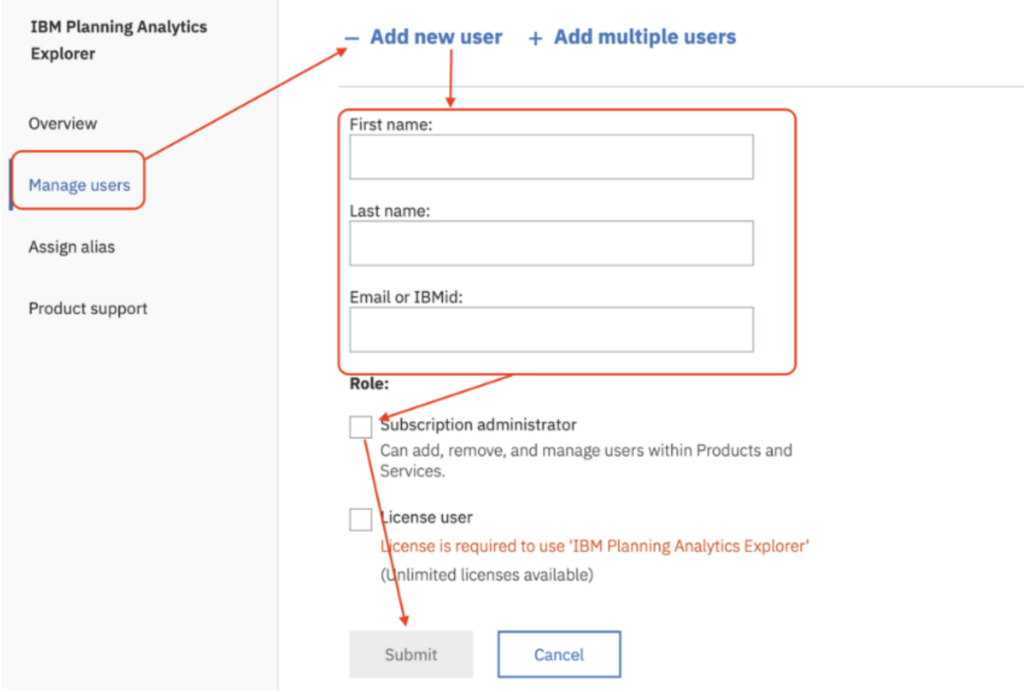
- Expand Add New User
- Enter the user’s:
- First Name
- Last Name
- Email Address
- IBM ID
- Tick the Subscription Administration option
- Click Submit
The user will then receive an email notification from IBM.
Adding Subscription Administrator Access to an Existing User #
To update an existing user:
- Navigate to: https://myibm.ibm.com
- Select your organisation and click Manage
- Select Manage Users from the left-hand menu
- Open the Licensed Users tab
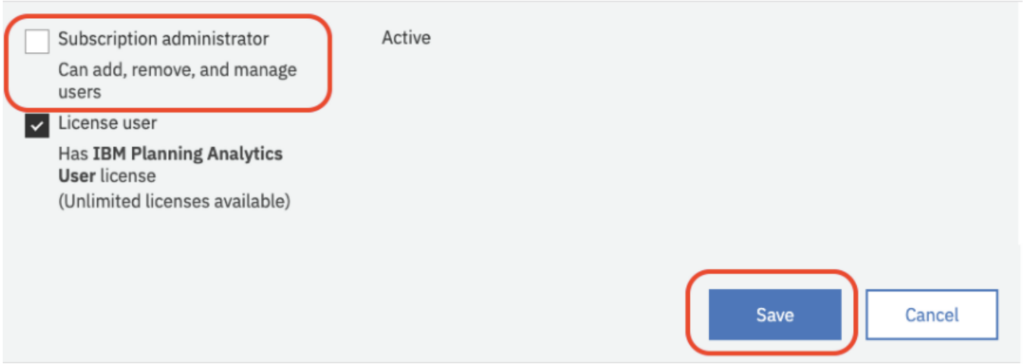
- Select the user you want to update
- Tick the Subscription Administrator option
- Click Save
Final thought #
Keeping Subscription Administrator access limited to the correct users helps maintain control over user management and licence usage within Planning Analytics. Regularly reviewing administrator access is considered good practice, particularly as teams and responsibilities change over time. If you need help managing your Planning Analytics environment, talk to us, we are always happy to help.


