Search site:

Aramar
  • About Us
  • Our Team
  • Join the Team
  • Insights & Updates
  • Talk to Us
  • Financial Reporting
    • Financial Reporting.

      • IBM Planning Analytics
      • IBM Controller
      • IBM Cognos Analytics
      • Fast Financials
      • Lease-16
      • IBM Planning Analytics.

        IBM Planning Analytics is business performance management software that combines budgeting and AI-enhanced forecasting with intuitive analysis, reporting and workflows.

      • IBM Controller

        IBM Controller delivers accurate, fully auditable financial results, a guided period close user experience, and automatic consolidation and reporting.

      • IBM Cognos Analytics

        IBM Cognos Analytics is infused with AI and offers an intuitive and user-friendly experience.

      • Fast Financials

        Our solution for Financial Consolidation, Reporting, Cash Flow and Planning

      • Lease-16

        Our accounting IFRS 16 and FRS 102 Lease management software solution

    • IBM Planning Analytics
    • IBM Controller
    • IBM Cognos Analytics
    • Fast Financials
    • Lease-16
  • ITFM
    • IBM Apptio.

      • IBM Apptio
      • IBM Apptio

        Take control of your IT spending and plan with confidence

      • IBM Apptio
    • ESG Reporting
      • IBM Envizi.

        • IBM Envizi
        • IBM Envizi

          Turn ESG data into clear, auditable insights and compliant reports.

      • IBM Envizi
    • Customer Success
      • Customer Success.

        • Customer Success Programme
        • Customer Stories
        • Customer Success Programme

          All our customers join our success program.

        • Customer Stories

          Don’t just take our word for it…

      • Customer Success Programme
      • Customer Stories
    • Support
      • Support & Delivery.

        • Implementation and Development
        • Cloud Migration
        • Support
        • IBM Licensing
        • IBM Expert-Led Training
        • IBM Health Checks
        • Implementation and Development

          From practical, hands-on development through to strategic guidance, our team of specialists is here to help.

        • Cloud Migration

          We have unrivalled experience in helping customers migrate their Business Analytics installations to the Cloud and helping them to take advantage of all IBM SaaS has to offer.

        • Support

          We are proud of our dedicated, friendly support desk, providing IBM Certified support and application support.

        • IBM Licensing

          As an Gold IBM partner, Aramar are able to negotiate the best terms with IBM on software licences and can provide wrap-around support to help you get the best from the products you have purchased.

        • IBM Training Workshops

          Practical workshops designed for all experience levels, from beginner users learning the fundamentals through to advanced users and administrators looking to expand their knowledge.

        • IBM Health Checks

          Get a clear, practical assessment of your IBM Planning Analytics or IBM Controller environment, including performance, governance and best practice recommendations.

      • Implementation and Development
      • IBM Cloud Migrations
      • Support
      • IBM Licensing
      • IBM Training Workshops
      • Health Checks
    • Knowledge Centre
      • Aramar Knowledge.

        • Aramar Specialist Knowledge
        • Server Versions
        • Expert insight for IBM users

          Explore upgrade guidance, how-to guides and technical best practice across the IBM suite. Practical, real-world insight to help you solve problems faster and get more from your IBM investment.

        • IBM Planning Analytics

          Find IBM Planning Analytics version numbers, release dates and corresponding server versions.

      • Aramar Specialist Knowledge
      • IBM Planning Analytics Server Versions
    • Our Team
    • Join the Team
    • Insights & Updates
    • Talk to Us

    IBM Planning Analytics

    54
    • How to: Add Planning Analytics database to Git repository (GitHub)
    • How To: Find out your Planning Analytics Version using Workbench (Planning Analytics on Cloud)
    • How to: Configure Planning Analytics for Excel (PAfE) Centrally
    • How To: Move Databases in Planning Analytics
    • What is a: Hierarchy in IBM Planning Analytics?
    • How to: Create Hierarchies From Attributes in IBM Planning Analytics.
    • Fundamentals: Feeders in IBM Planning Analytics
    • How To: Install/Uninstall Planning Analytics for Excel (PAfE)
    • How to: Add a new Element to an existing Dimension in IBM Planning Analytics
    • How to: Edit Dimensions in IBM Planning Analytics
    • How to: Prevent Data Loss Using the Leaves Hierarchy in IBM Planning Analytics
    • How to: Find the Current Subscription Administrator
    • How to: Remove a Subscription Administrator
    • How To: Add a Subscription Administrator
    • What is a: Subscription Administrator
    • How to: Check and manage your IBM Planning Analytics licence usage vs. your licence entitlement
    • What are: Parameters in Planning Analytics
    • What is a: Data Source
    • How to: Create a Turbo Integrator (TI) Process in IBM Planning Analytics?
    • How To: Apply Formats to Data Elements
    • What are: Dimensions in IBM Planning Analytics
    • How to: Use a Cube View in Planning Analytics for Excel (PAfE)
    • How to: Create a Cube in IBM Planning Analytics
    • How to: Fix Views That Need Refreshing in IBM Planning Analytics
    • How to: Hide Cubes from Users in IBM Planning Analytics
    • Aramar Tips: Working with Subsets in IBM Planning Analytics
    • How To: Subscribe to IBM Security Bulletins for Planning Analytics, Cognos Analytics and Controller
    • How to: Enable dark mode in Planning Analytics Workspace
    • How to: Compare scripts in Planning Analytics Workspace
    • How to: Review process changes in Planning Analytics Workspace
    • How to: Check whether a Dimension exists in IBM Planning Analytics
    • How to: Control Who Has Access to the Planning Analytics Assistant
    • 5 Top Tips for Working with Planning Analytics for Excel (PAfE)
    • How to: Add Spacer Rows and Columns to Universal Reports in Planning Analytics for Excel (PAfE)
    • How to: Load a file via process in Planning Analytics Workspace (PAW)
    • How To: Create a simple hierarchy in Planning Analytics
    • How to: Change maximum login attempts to Planning Analytics on Cloud
    • How to: Using the While statement Turbo Integrator Process in IBM Planning Analytics
    • How to: Change a Dimension Element Weight in Planning Analytics via TI process
    • How to: Mapping a CSV data source directory in IBM Planning Analytics on Cloud
    • How to: Mapping a Network Drive between Live and Development Environments in Planning Analytics on Cloud
    • How To: Resolve ODBC error ‘unable to open connection to database’ in IBM Planning Analytics 
    • How To: Investigating issues using the TM1 Server Log
    • How To: Check the version of IBM Planning Analytics for Excel
    • How to: Change the display row limit in Planning Analytics for Excel
    • How To: Set up Inactivity Timeout Sessions in IBM Planning Analytics
    • How to: Check the Security of a Dimension in IBM Planning Analytics
    • Aramar Tips: Using PowerShell in Planning Analytics
    • Fundamentals: DBRW in Planning Analytics
    • How to: Create a Dimension in IBM Planning Analytics
    • How to: Create Subsets driven by another Dimension in Planning Analytics
    • Aramar Tips: Creating documentation IBM Planning Analytics
    • Aramar Tips: Checking your parameters with a Planning Analytics TI Process
    • Aramar Tips: Analysing Data in IBM Planning Analytics for Excel

    IBM Controller

    29
    • Fundamentals: What’s the difference between IBM Controller Web and IBM Controller Classic?
    • How to: create Company Journals Across Review Report in Controller Web
    • How to: Clear the local cache within Controller
    • How to: Check currency translation using a standard report in IBM Controller
    • When: Does the FAP Publish Client from Controller Need Updating?
    • How to: Create Multi Period Import Specs in IBM Controller Web
    • How To: Subscribe to IBM Security Bulletins for Planning Analytics, Cognos Analytics and Controller
    • Weekly reporting vs period close in IBM Controller: what to consider
    • How to: Audit the Licenced Number of Controller Users
    • How to: Reconcile Data by Company in IBM Controller Web
    • Aramar Tips: The Benefits of Using IBM Controller Web for Data Import via Import Specifications
    • How to: Improve your Controller Excel Report Performance
    • How to: Change the reporting currency belonging to a local subsidiary (or reporting entity) in IBM Controller
    • How to: Effectively structure user security in IBM Controller
    • How to: Run an internal database optimise in IBM Controller
    • How to: Schedule an internal optimise in IBM Controller
    • How to: Drill Data within IBM Controller
    • How to: Change the reporting currency belonging to the group consolidation in IBM Controller
    • How To: Change the method of translation applied to the P&L statement, or create different P&L translation views from the same source data in IBM Controller
    • How to: Check when a Company was last updated (and by who) from within IBM Controller Web
    • How to: Consolidate a Submission in IBM Controller Web
    • How To: Interrogate the backend SQL table using IBM Controller
    • How To: Fix the Intercompany button not appearing in IBM Controller
    • How to: Check the size of your IBM Controller database
    • How to: Condense XACCLOCK Table
    • How to: Save Time Posting Journals on Accounts That Reconcile to Each Other
    • How to: Add Companies to Linked Structures Directly from the Company Structure Menu
    • How to: Back Up an IBM Controller Database
    • How to: Navigate the Backend SQL tables within IBM Controller

    Extra Insights

    3
    • How To: Subscribe to IBM Security Bulletins for Planning Analytics, Cognos Analytics and Controller
    • How to: Manage Users in IBM MySupport
    • Aramar Tips: 5 Easy tips to consider when adding commentary to your financial reports 

    IBM Cognos Analytics

    1
    • How to: Secure Data Modules in IBM Cognos Analytics on Cloud On-Demand
    View Categories
    • Home
    • knowledge-share
    • IBM Cognos Analytics
    • How to: Secure Data Modules in IBM Cognos Analytics on Cloud On-Demand

    How to: Secure Data Modules in IBM Cognos Analytics on Cloud On-Demand

    If users need to create reports and other content from a Data Module in IBM Cognos Analytics, you may want them to be able to use the Data Module without being able to edit it.

    In this guide, we’ll show you how to restrict access to Data Modules in IBM Cognos Analytics on Cloud On-Demand, while still allowing users to use them to author content.

    There are three main steps:

    1. Create a user group for those who need restricted access.
    2. Give the group read-only access to the folder containing your Data Modules.
    3. Deny Web-based modelling so members of the group cannot open or edit the Data Modules.

    For this example, we’ll use a group called Secured Data Modules.

    1. Create a user group #

    From the main menu in IBM Cognos Analytics, go to:

    Manage > People > Accounts > Cognos

    Select Create group.
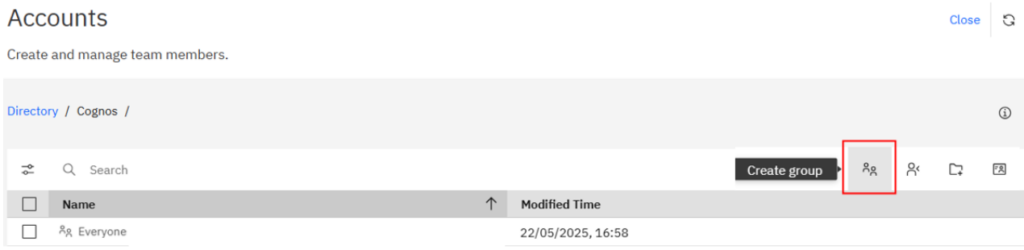
    Give your group a suitable name, such as Secured Data Modules, and add a description if required.

    Select Next > Add members, find the users you want to restrict and add them to the group.

    Select Apply, followed by Create.
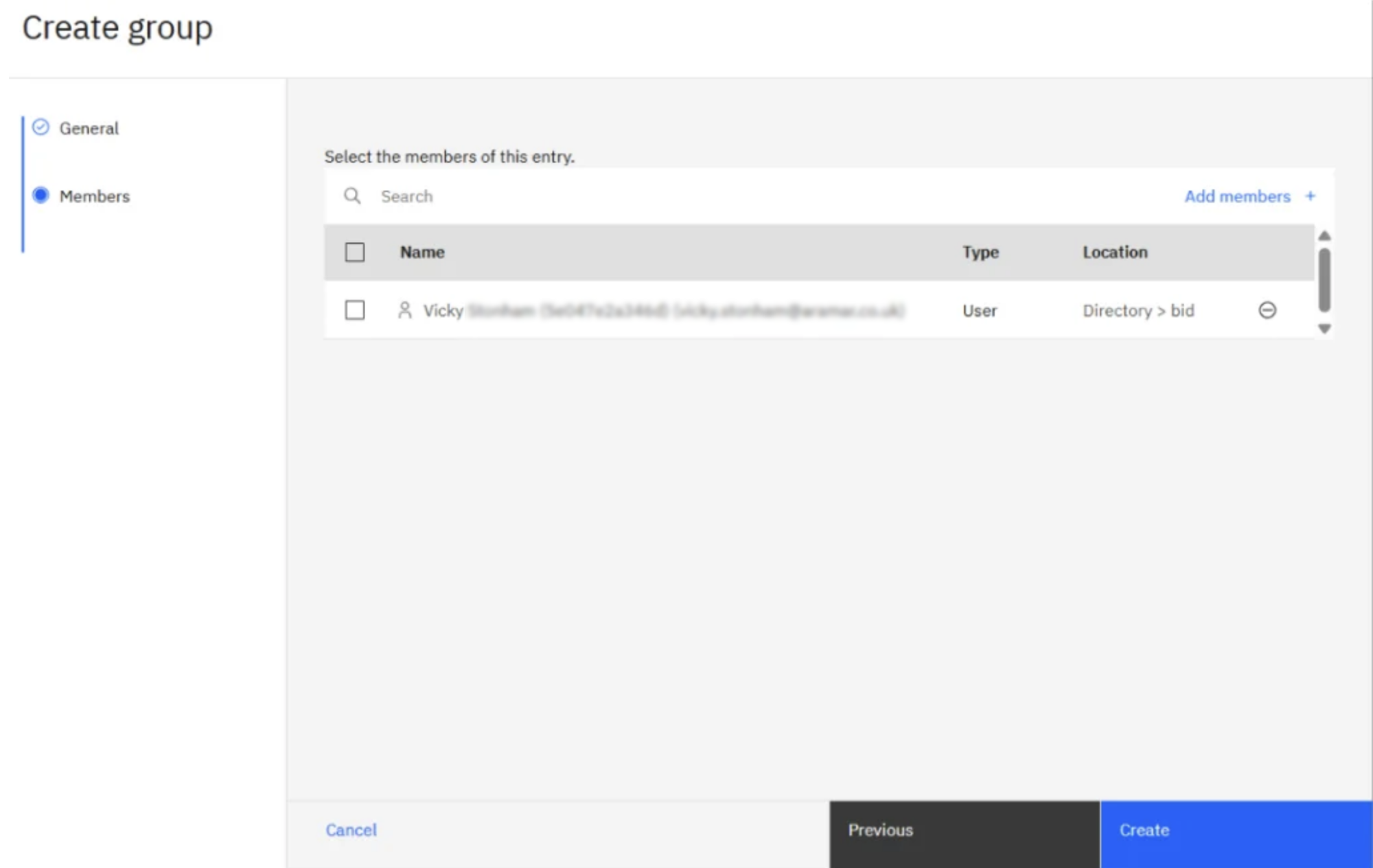
    Your restricted user group is now ready.

    2. Set the Data Module folder permissions #

    Next, we’ll prevent members of the group from saving changes to the folder containing the Data Modules.

    Navigate to the relevant Data Module folder and open Properties > Permissions.

    Select Override parent permissions and remove the existing entries.
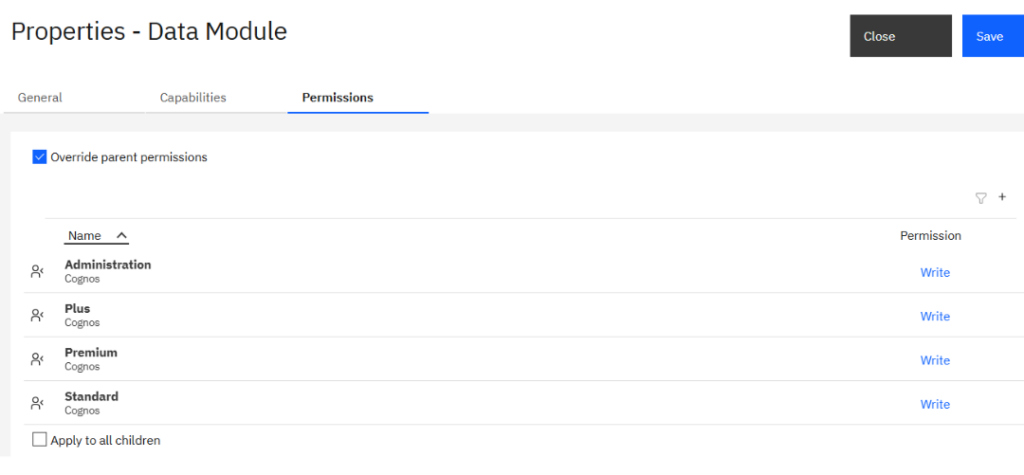
    Select + to add a new entry and navigate to Cognos.

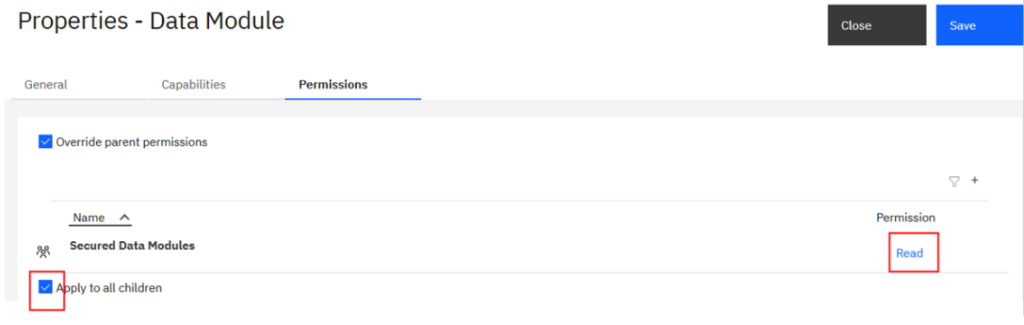
    Choose the Secured Data Modules group and select Add.

    The group should now appear with Read permission.

    Select Apply to all children to apply these permissions to all Data Modules within the folder, then select Save and Close.
    Tip: You can apply these permissions to individual users instead, but using a group generally makes access easier to manage.

    Members of the group can now access the folder, but they cannot save changes to it.

    However, at this stage they can still open a Data Module. We therefore need to make one further change.

    3. Deny Web-based modelling #

    Return to the Data Module folder and open:

    Properties > Capabilities > Set capabilities

    Turn on Override capabilities and select Add.

    Navigate to Cognos, select the Secured Data Modules group and choose Apply.
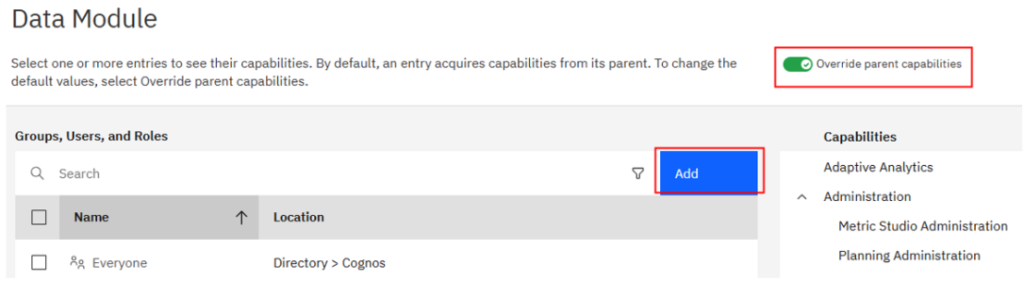
    Select Override child capabilities so the setting is inherited by the Data Modules within the folder.

    Select the Secured Data Modules group and find Web based modelling in the capabilities list.

    Set Web based modelling to Deny.

    Select Save and Close.
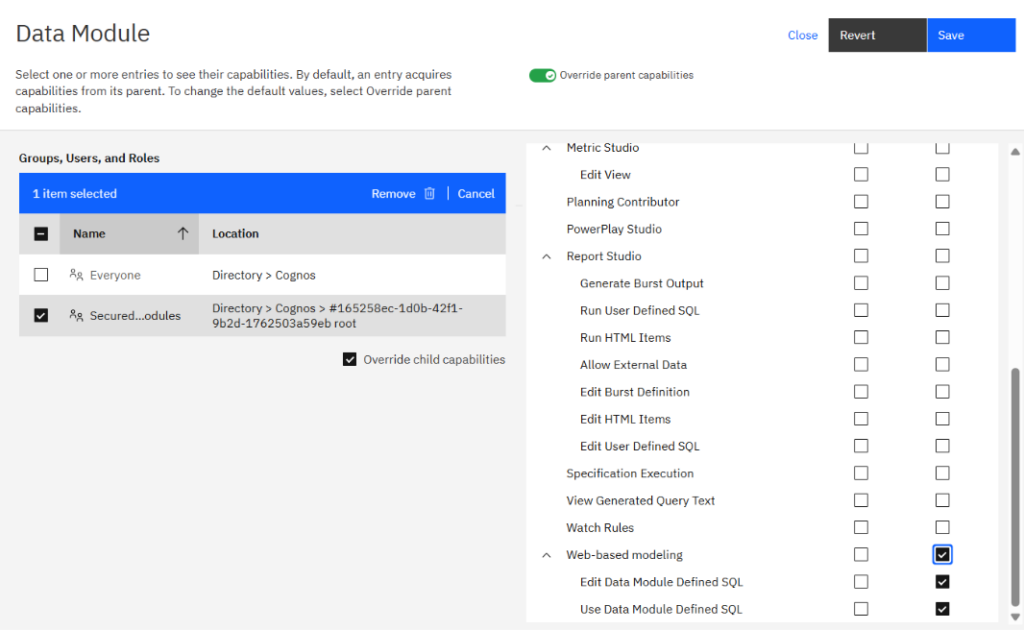
    The Data Modules within the folder will inherit these capabilities. Members of the restricted group will therefore be unable to open or edit the secured Data Modules.

    What happens to new Data Modules? #

    Any Data Modules subsequently added to the secured folder will inherit the folder permissions. Members of the Secured Data Modules group will therefore be unable to edit them or save changes to the folder.

    Important #

    Users can still copy a secured Data Module into another folder where they have full permissions, such as My content, and edit their own copy.

    They cannot, however, overwrite the secured Data Module held within the protected Team content folder.

    Need help with IBM Cognos Analytics? #

    If you need help managing security, access or your wider IBM Cognos Analytics setup, get in touch with the Aramar team.

    Updated on August 25, 2026

    Was this helpful?

    • Happy
    • Normal
    • Sad

    Share This Article :

    • Facebook
    • X
    • LinkedIn
    How to: Secure Data Modules in IBM Cognos Analytics on Cloud On-DemandHow to: Secure Data Modules in IBM Cognos Analytics on Cloud On-Demand
    Sections
    • 1. Create a user group
    • 2. Set the Data Module folder permissions
    • 3. Deny Web-based modelling
    • What happens to new Data Modules?
      • Important
    • Need help with IBM Cognos Analytics?

    Our Accreditations and Partners

    Aramar works with customers of all sizes, from a range of industries helping them with Business Analytics, Business Process, Sustainability and AI solutions using IBMs leading software solutions.

    email contactus@aramar.co.uk

    • LinkedIn
    • YouTube

    Registered Address:
    124 City Road,
    London,
    EC1V 2NX

    © Aramar 2026. All Rights Reserved.

    Terms of use Privacy Policy

    Website and Marketing by Unity Online