What is Turbo Integrator? #
TurboIntegrator (TI) is the primary scripting engine within IBM Planning Analytics. It is used to automate data imports, metadata management, and model maintenance.
A TI process works by connecting to a data source, defining variables, and executing scripts across four sequential procedures.
Creating a TI Process #
To create a TI process in Planning Analytics: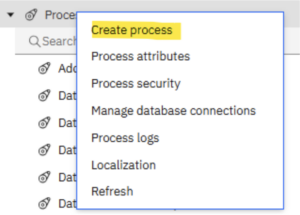
- Go to Workbench
- In Workbench, open the Database Tree
- Locate the Processes icon
- Right-click Processes
- Select Create Process
You will then need to:
- specify the database
- add a process name
- click Create
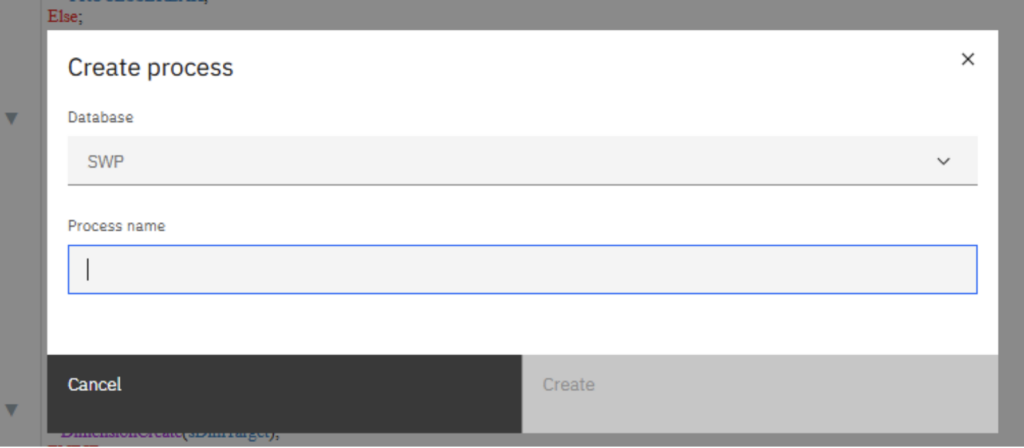
The process will open in a new tab within the script editor.
Understanding the Script Tabs #
Within the script page, you will see four different sections:
- Prolog
- Metadata
- Data
- Epilog
When a process runs, these sections execute in the following order:
Prolog #
Statements in the Prolog run before the data source is processed.
This section is typically used for administrative tasks, such as:
- clearing a target view
- creating a dimension
- preparing temporary objects
Metadata #
The Metadata section is used for structural changes.
For example:
- adding elements to dimensions
- building hierarchies
This section scans every record in the data source.
Data #
The Data section is where values are manipulated.
Statements here run for every record in the source to:
- load data into cubes
- perform cell-level calculations
Epilog #
Statements in the Epilog run after the entire data source has been processed.
This section is commonly used for cleanup tasks, such as:
- deleting temporary views
- logging completion messages
The Metadata and Data sections are mainly used when a data source has been defined.
Final thought #
Understanding the structure of a Turbo Integrator process is the first step towards automating and maintaining your Planning Analytics environment more efficiently. Once you become familiar with the different script sections, it becomes much easier to build processes that are clear, reusable, and easier to manage. If you need help with Turbo Integrator development or Planning Analytics best practice, talk to us, we are always happy to help.


