TurboIntegrator (TI) parameters are variables used to generalise a process. They allow you to pass specific values, such as a year, department, or version, at runtime instead of hard coding them into the script.
Parameter Properties #
Name #
A unique identifier for the parameter, for example:
pYear
It is considered best practice to use a prefix such as p to distinguish parameters from standard variables.
Type #
Parameters can be either:
- Numeric
- String
Default Value #
The value used if no other value is provided during execution.
Prompt Question #
The text shown to users when running the process manually. This explains what input is required.
Example: Dimension Copy Process #
In this example, a process was created to copy a dimension.
The following parameters were created:
pDimSource→ specifies the source dimension namepDimTarget→ specifies the target dimension namepFlat→ controls whether the copied dimension is flat or contains rollupspReset→ controls the reset behaviour if the target dimension already exists
Prompt text was also added to guide the user when running the process.

The parameters are then referenced within the script itself.
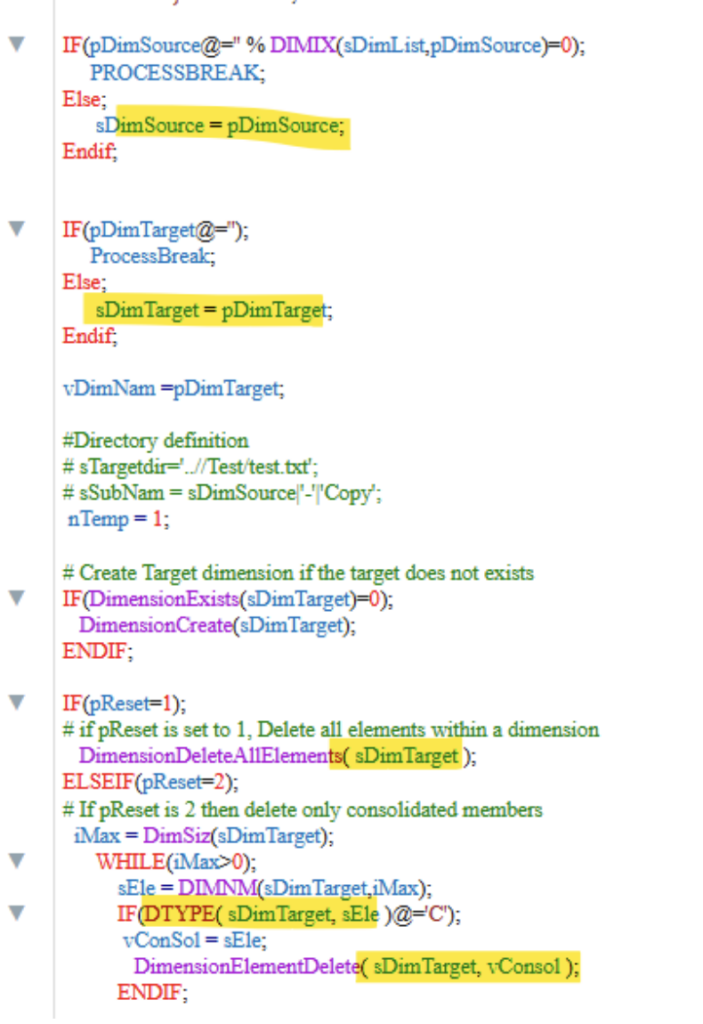
This allows the same process to be reused against different source and target dimensions without rewriting the script.
Final thought #
Parameters are a simple but powerful way to make Turbo Integrator processes more flexible and reusable. Instead of creating multiple versions of the same process, parameters allow you to adapt behaviour at runtime while keeping scripts easier to manage and maintain. If you need help building scalable Planning Analytics processes, talk to us, we are always happy to help.


