IBM Controller Web makes it much easier to access financial reports from your browser, but if you’ve previously used Controller Classic you may have noticed one report is missing.
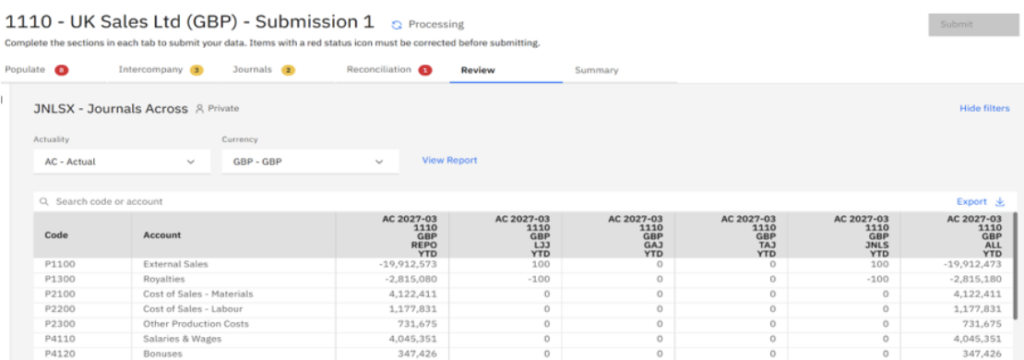
The Company Journals Across report provides a useful audit trail, allowing you to follow balances from Reported Values (REPO) through each journal stage to the final consolidated total. While there isn’t a direct equivalent in Controller Web, you can recreate the same functionality using the Review workspace with a small configuration change.
In this article, we’ll show you how.
Why create this report? #
The standard Company Journals Across report in Controller Classic allows you to:
- Review a specific company and form.
- Follow the audit trail from Reported Values (REPO) through each journal type.
- See the cumulative journal movements.
- Reconcile the figures to the final closing version.
Controller Web can produce a very similar report, although by default it only allows you to select Closing Versions, not individual journal types.
Fortunately, there’s a simple workaround.
Step 1: Create a Review report in Controller Web #
Navigate to the Review tab in Controller Web and create a new report.
When defining the columns, add the closing versions you want to compare.
For example:

At this point you’ll have a report comparing closing versions, but you won’t yet be able to separate individual journal types.
Step 2: Create closing versions for each journal type #
To report on each journal type individually, you’ll first need to create dedicated closing versions in Controller Classic.
Navigate to:
Maintain → Configuration → Define → Closing Versions / Journal Types
Create a separate closing version for each journal type you want to report on.
For example:
- Local Journals
- Group Adjustment Journals
- Tax Adjustment Journals
- Local Journals (REPO Roll Forward)
Each closing version should contain only the corresponding journal type.

Tip: To keep the coding unique, avoid using exactly the same code as the journal type itself. In this example, a “J” has been added to the end of each code to distinguish the closing version from the journal type.
Step 3: Update your Review report #
Return to your Review report in Controller Web.
Edit the report and replace the standard journal closing version with the new journal-specific closing versions you created.
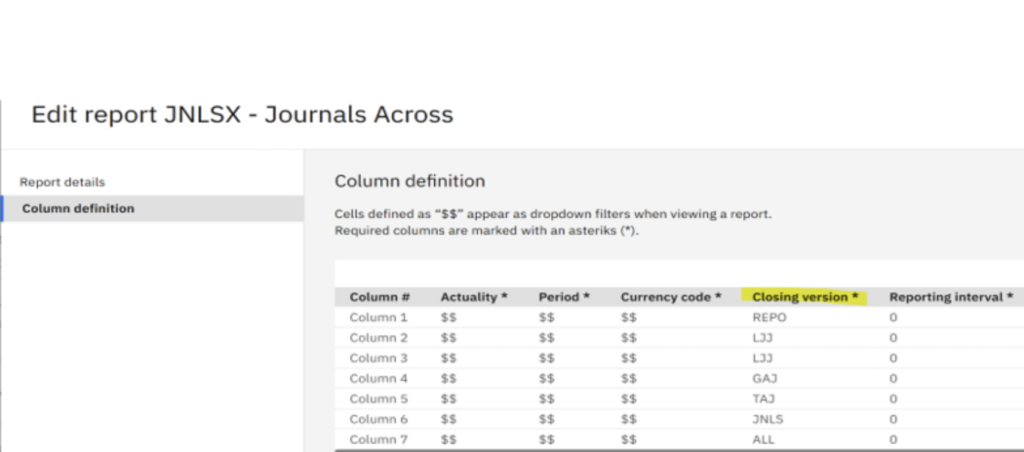
This recreates the functionality of the classic Company Journals Across report directly within Controller Web.
Step 4: Reuse the report for other forms #
One advantage of this approach is that the report isn’t limited to a single form.
Select the ellipsis (…) beside the report and choose Edit.

Under Report Details, simply change the Row Definition to another standard form.

This allows the same report structure to be reused across multiple financial statements without rebuilding it from scratch.
Final thoughts #
Although Controller Web doesn’t include a built-in equivalent of the Company Journals Across report, a small amount of configuration allows you to recreate the same audit trail using the Review workspace.
By creating journal-specific closing versions, you gain a flexible report that clearly shows reported values, individual journal movements, journal totals and the final consolidated balance. Better still, the report can be reused across multiple forms simply by changing the row definition.
If you’d like help getting more from IBM Controller or need assistance building bespoke reports for your finance team, Aramar’s IBM Controller specialists are here to help. Whether you’re enhancing existing reports or planning a wider Controller optimisation project, we’d be happy to discuss your requirements.


