Search site:

Aramar
  • About Us
  • Our Team
  • Join the Team
  • Insights & Updates
  • Talk to Us
  • Financial Reporting
    • Financial Reporting.

      • IBM Planning Analytics
      • IBM Controller
      • IBM Cognos Analytics
      • IBM Planning Analytics.

        IBM Planning Analytics is business performance management software that combines budgeting and AI-enhanced forecasting with intuitive analysis, reporting and workflows.

      • IBM Controller

        IBM Controller delivers accurate, fully auditable financial results, a guided period close user experience, and automatic consolidation and reporting.

      • IBM Cognos Analytics

        IBM Cognos Analytics is infused with AI and offers an intuitive and user-friendly experience.

    • IBM Planning Analytics
    • IBM Controller
    • IBM Cognos Analytics
  • ITFM
    • IBM Apptio.

      • IBM Apptio
      • IBM Apptio

        Take control of your IT spending and plan with confidence

    • ESG Reporting
      • IBM Envizi.

        • IBM Envizi
        • IBM Envizi

          Turn ESG data into clear, auditable insights and compliant reports.

      • IBM Envizi
    • Customer Success
      • Customer Success.

        • Customer Success Programme
        • Customer Stories
        • Customer Success Programme

          All our customers join our success program.

        • Customer Stories

          Don’t just take our word for it…

      • Customer Success Programme
      • Customer Success
    • Support
      • Support & Delivery.

        • Implementation and Development
        • Cloud Migration
        • Support
        • IBM Licensing
        • Implementation and Development

          From practical, hands-on development through to strategic guidance, our team of specialists is here to help.

        • Cloud Migration

          We have unrivalled experience in helping customers migrate their Business Analytics installations to the Cloud and helping them to take advantage of all IBM SaaS has to offer.

        • Support

          We are proud of our dedicated, friendly support desk, providing IBM Certified support and application support.

        • IBM Licensing

          As an Gold IBM partner, Aramar are able to negotiate the best terms with IBM on software licences and can provide wrap-around support to help you get the best from the products you have purchased.

      • Implementation and Development
      • IBM Cloud Migrations
      • Support
      • IBM Licensing
    • Knowledge Centre
      • Aramar Knowledge.

        • Aramar Specialist Knowledge
        • Expert insight for IBM users

          Explore upgrade guidance, how-to guides and technical best practice across the IBM suite. Practical, real-world insight to help you solve problems faster and get more from your IBM investment.

      • Fast Financials
      • Financial Planning and Analysis 
      • Lease Accounting
    • About Us
    • Our Team
    • Join the Team
    • Insights & Updates
    • Talk to Us

    IBM Planning Analytics

    36
    • How to: Check whether a Dimension exists in IBM Planning Analytics
    • How to: Control Who Has Access to the Planning Analytics Assistant
    • 5 Top Tips for Working with Planning Analytics for Excel (PAfE)
    • How to: Add Spacer Rows and Columns to Universal Reports in Planning Analytics for Excel (PAfE)
    • How To: Subscribe to IBM Security Bulletins for Planning Analytics, Cognos Analytics and Controller
    • How to: Load a file via process in Planning Analytics Workspace (PAW)
    • How To: Find out your Planning Analytics Version using Workbench (Planning Analytics on Cloud)
    • How To: Create a simple hierarchy in Planning Analytics
    • How to: Change maximum login attempts to Planning Analytics on Cloud
    • How to: Using the While statement Turbo Integrator Process in IBM Planning Analytics
    • How to: Change a Dimension Element Weight in Planning Analytics via TI process
    • Aramar Tips: Moving Databases in Planning Analytics
    • How to: Mapping a CSV data source directory in IBM Planning Analytics on Cloud
    • How to: Mapping a Network Drive between Live and Development Environments in Planning Analytics on Cloud
    • How To: Resolve ODBC error ‘unable to open connection to database’ in IBM Planning Analytics 
    • How To: Investigating issues using the TM1 Server Log
    • How To: Check the version of IBM Planning Analytics for Excel
    • How to: Check and manage your IBM Planning Analytics licence usage vs. your licence entitlement
    • How to: Change the display row limit in Planning Analytics for Excel
    • How To: Set up Inactivity Timeout Sessions in IBM Planning Analytics
    • How To: Install Planning Analytics for Excel (PAfE)
    • How to: Check the Security of a Dimension in IBM Planning Analytics
    • Aramar Tips: Using PowerShell in Planning Analytics
    • Fundamentals: Feeders in IBM Planning Analytics
    • Fundamentals: Cube Viewer in Planning Analytics for Excel
    • Fundamentals: DBRW in Planning Analytics
    • How to: Create a Dimension in IBM Planning Analytics
    • Fundamentals: What are Dimensions in IBM Planning Analytics?
    • How to: Edit Dimensions in IBM Planning Analytics
    • How to: Create a Cube in IBM Planning Analytics
    • How to: Create Subsets driven by another Dimension in Planning Analytics
    • Aramar Tips: Creating documentation IBM Planning Analytics
    • Aramar Tips: Checking your parameters with a Planning Analytics TI Process
    • Aramar Tips: Analysing Data in IBM Planning Analytics for Excel
    • How to: Add a new Element to an existing Dimension in IBM Planning Analytics
    • Aramar Tips: Working with Subsets in IBM Planning Analytics

    IBM Cognos Analytics

    1
    • How To: Subscribe to IBM Security Bulletins for Planning Analytics, Cognos Analytics and Controller

    IBM Controller

    29
    • Weekly reporting vs period close in IBM Controller: what to consider
    • How to: Audit the Licenced Number of Controller Users
    • How to: Reconcile Data by Company in IBM Controller Web
    • Aramar Tips: The Benefits of Using IBM Controller Web for Data Import via Import Specifications
    • How to: Improve your Controller Excel Report Performance
    • Fundamentals: What’s the difference between IBM Controller Web and IBM Controller Classic?
    • How to: Create Multi Period Import Specs in IBM Controller Web
    • How to: Change the reporting currency belonging to a local subsidiary (or reporting entity) in IBM Controller
    • How to: Effectively structure user security in IBM Controller
    • How to: Run an internal database optimise in IBM Controller
    • How to: Schedule an internal optimise in IBM Controller
    • How to: Check currency translation using a standard report in IBM Controller
    • How to: Drill Data within IBM Controller
    • How to: Change the reporting currency belonging to the group consolidation in IBM Controller
    • How To: Change the method of translation applied to the P&L statement, or create different P&L translation views from the same source data in IBM Controller
    • How to: Check when a Company was last updated (and by who) from within IBM Controller Web
    • How to: Consolidate a Submission in IBM Controller Web
    • How To: Log into Citrix for the first time using IBM Controller on Cloud
    • How To: Interrogate the backend SQL table using IBM Controller
    • How To: Fix the Intercompany button not appearing in IBM Controller
    • How to: Check the size of your IBM Controller database
    • How to: Clear the local cache within Controller
    • How to: Condense XACCLOCK Table
    • How To: Subscribe to IBM Security Bulletins for Planning Analytics, Cognos Analytics and Controller
    • How to: Save Time Posting Journals on Accounts That Reconcile to Each Other
    • How to: Add Companies to Linked Structures Directly from the Company Structure Menu
    • How to: Back Up an IBM Controller Database
    • How to: Navigate the Backend SQL tables within IBM Controller
    • How to: When Does the FAP Publish Client from Controller Need Updating?

    Extra Insights

    3
    • How To: Subscribe to IBM Security Bulletins for Planning Analytics, Cognos Analytics and Controller
    • How to: Manage Users in IBM MySupport
    • Aramar Tips: 5 Easy tips to consider when adding commentary to your financial reports 
    View Categories
    • Home
    • knowledge-share
    • IBM Controller
    • How to: Navigate the Backend SQL tables within IBM Controller

    How to: Navigate the Backend SQL tables within IBM Controller

    The information in this article should be used in conjunction with Knowledge Share article “How to: Interrogate the Backend SQL Table using IBM Controller” 

    The Period Table  

    The most widely used data table for SQL query is the Period Table. This is presented in the ID format “XDBxx”.  Here the “xx” represents the year of the period being reported against.  For example, data posted to period 2406AC would sit on period table XDB24. 

    The following table summarises the purpose or description belonging to each of the columns within this Period Table. 

    Field Name  Description 
    BELOPP  Amount 
    BOL  Company 
    BTYP  Journal Type 
    DIM1  Dimension 1 
    DIM2  Dimension 2 
    DIM3  Dimension 3 
    DIM4  Dimension 4 
    ETYP  Automatic Journal Type 
    INO  Automatic Identification Number 
    KONTO  Account Code 
    KTYPKONC  The group type and group to which values from the elimination of the acquisition calculations are booked. 
    MOTBOL  Counter Company used for intercompany balances and shareholdings. 
    MOTDIM  Counter Dimension used for eliminations of intercompany balances. This is only valid for dimension 1. 
    PERAKT  Period and Actuality 
    TRAVKD  Transaction Currency Code . 
    TRBELOPP  Transaction Currency Amount 
    URSBOL  Original Company (is different from BOL after consolidation), which reported the intercompany balance. 
    VERNR  Journal Number 
    VKOD  Currency Code 
    VTYP  Currency Type, where the field indicates if a journal has been entered in another currency than the local currency. 

    Table Operators or Test Selections  #

    To navigate within the likes of this Period Table within SQL, you will need to use operators, as either selected or typed into the Test Field. 
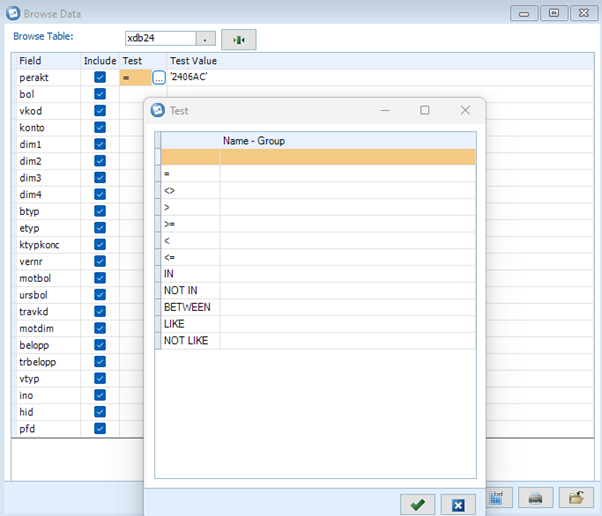
    As illustrated, there are several different selections that can be used, each of which is described as follows:

    = Shows all values or strings equal to the defined criteria. For example, konto = ‘1390’ only displays the account 1390 in the result window.
    <> Shows all values or strings separated from the defined criteria.
    < Shows all values or strings less than the defined criteria.
    <= Shows all values or strings less than or equal to the defined criteria.
    > Shows all values or strings greater than the defined criteria.
    >= Shows all values or strings greater than or equal to the defined criteria.
    IN Shows all values or strings you specify. The test values are entered within parentheses and single citation marks. When entering several test values, they are separated by a comma (,). For example, konto IN (‘1310′,’2081’) will display both account 1310 and account 2081.
    NOT IN Shows all values or strings apart from the ones you specify. The test values are entered within parentheses and single citation marks. When entering several test values, they are separated by a comma (,) For example, konto NOT IN (‘1310′,’2081’) shows all accounts except 1310 and 2081.
    BETWEEN Shows all test values within the specified range. Separate the start value and the end value with AND. For example, konto BETWEEN ‘1310’ AND ‘2081’ shows all accounts between the accounts 1310 and 2081
    LIKE Shows all test values within the specified criteria. Here you can use wild cards to search for similar strings or values. For example, konto LIKE ‘131_’ shows all four character accounts starting with 131. Another example, fkod LIKE ‘FR%’ shows all dimension codes starting with FR.
    NOT LIKE Shows all test values except the specified criteria. Here you can use wild cards to search for similar strings or values. For example, fkod NOT LIKE ‘FR%’ shows all dimension codes except the ones starting with FR


    The latest IBM Controller production documentation can be found on the IBM website – here

    Updated on September 6, 2024

    Was this helpful?

    • Happy
    • Normal
    • Sad

    Share This Article :

    • Facebook
    • X
    • LinkedIn
    How to: Back Up an IBM Controller DatabaseHow to: When Does the FAP Publish Client from Controller Need Updating?
    Sections
    • Table Operators or Test Selections 

    Our Accreditations and Partners

    Aramar works with customers of all sizes, from a range of industries helping them with Business Analytics, Business Process, Sustainability and AI solutions using IBMs leading software solutions.

    email contactus@aramar.co.uk

    • LinkedIn
    • YouTube

    Registered Address:
    124 City Road,
    London,
    EC1V 2NX

    © Aramar 2026. All Rights Reserved.

    Terms of use Privacy Policy

    Website and Marketing by Unity Online