IBM Controller licensing is intentionally flexible, but that flexibility means it requires active oversight.
The Controller application is self-policing when it comes to licence consumption. While you may have purchased a defined number of licences (for example, 25 or 50 users), the system will not prevent you from adding more users than you are licensed for.
Because of this, it’s important to regularly review licence usage and compare it with your contracted entitlement. Without visibility, it’s easy for user numbers to drift over time or where access has been granted temporarily and never removed.
As noted later in this article, active licences consumed should always match or fall below your contracted licence entitlement. If this is not the case, customers may be charged for over-entitlement usage (and nobody wants that), for example following an IBM audit.
This article explains how to check licence usage within Controller, depending on the version you are running.
Licence Management Report (Controller 10.4.1 and Later) #
From Controller version 10.4.1 onwards, administrators can access the Licence Management Report, which provides a clear overview of licence consumption directly within Controller Classic.
You can generate this report by:
-
Clicking Maintain
-
Selecting Rights
-
Selecting Reports
-
Clicking Generate (as shown in the screenshot below)
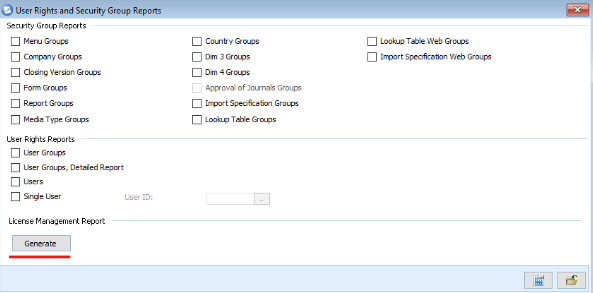
The report is generated as a PDF and includes the following information:
Active Administrator Users #
These users contribute to the number of administrator licences consumed.
-
For on-premise Controller installations, administrator licences are a distinct licence type and must be purchased accordingly.
-
For Controller on IBM SaaS, there is no licence cost difference between Administrator and Standard users.
Active Standard Users #
These users contribute to the number of standard (or local) user licences consumed.
Inactive Users #
Inactive users do not consume licences. Reviewing and deactivating users who no longer need access is one of the simplest ways to stay within licence entitlement.
Licence Checks for Legacy Versions (Pre-10.4.1) #
Note on legacy versions:
IBM Controller versions in the 10.4.x series reached end of IBM support on 30 September 2024. While the number of organisations still running versions prior to 10.4.1 is expected to be small, some organisations may still be operating out-of-support versions. For completeness, the manual licence review process for these environments is outlined below:
-
Click Maintain
-
Select Rights
-
Click Users
At the bottom of the Users screen, you will see the “No. of Named Users”, which shows the total number of defined users.
Identifying how many of these users are Administrators requires additional manual review. This is done by checking User limitation settings and Security group content.
If a user has any Administrator-level menu options enabled, they should be counted as consuming an administrator licence. IBM provides documentation that details which menu options fall under the Administrator role.
Licensing Best Practice #
We strongly recommend that:
-
Active licences consumed match or fall below your contracted licence entitlement
-
Licence usage is reviewed periodically, not just during audits or renewals
For on-premise in particular, careful attention should be paid to the number of users defined as Administrators, as it is easy to exceed entitlement without realising. Regular licence checks help avoid unexpected costs and ensure you remain compliant with your agreement.
Administrator vs Non-Administrator Users #
IBM Controller does not explicitly label which users are considered Administrators within the application itself. Instead, Administrator classification is determined by the menu options and meta-structure permissions assigned to a user.
This distinction is particularly important for on-premise Controller, where Administrator and Standard users are licensed differently. However, even in IBM SaaS environments (where licence cost does not differ), we still recommend actively managing this separation as a matter of good application governance.
IBM provides detailed guidance on which menu options and responsibilities classify a user as an Administrator. This information is available via IBM Support (IBM account login required):
👉 Controller licensing – What is the difference between an Administrator and Non-Administrator user
Not sure how your Controller licence usage compares to your entitlement?
If you’d like help reviewing it, we’re always happy to talk it through.


