By combining two or more dimensions, you can create a data cube. Within a cube, each intersection of dimension elements holds a value. This means every data point has its own unique set of coordinates, based on the elements selected from each dimension.
You can adjust how dimensions are arranged within the cube to view the data in different ways, depending on what you need to analyse.
Data within a cube will automatically aggregate through dimension hierarchies. This allows you to view summarised totals and then drill down into lower levels to explore more detailed data.
Creating a Cube #
To create a cube:
- Open the Data and Models workbench
- In the data tree, right-click on Cubes
- Select Create cube
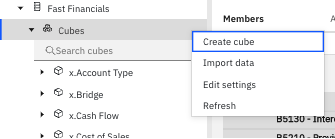
A Create cube panel will open on the right-hand side. From here:
- Enter a name for your cube
- Select the dimensions you want to include
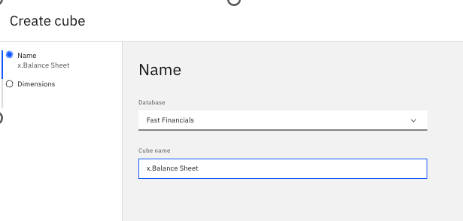
To manage dimensions:
- Use the right arrow to add dimensions to the cube
- Use the left arrow to remove them
- Use the up and down arrows to change the order of dimensions
Once complete, click Create to save the cube.
Deleting a Cube #
To delete a cube:
- Right-click on the cube in the data tree
- Select Delete cube
Deleting a cube will permanently remove all data and any rules associated with it. The dimensions themselves will not be affected.
If you’d like help setting up or managing your cubes, talk to us. We’re always happy to help.


