Working with large dimensions in IBM Planning Analytics Workspace can quickly become overwhelming. Subsets are a simple way to focus on exactly the data you need, helping you build cleaner views and reduce repetitive work.
In this guide, we walk through how to create and use subsets for more efficient analysis.
What is a subset? #
A subset is a saved selection of elements from a dimension.
Instead of rebuilding the same view each time, you can create a subset once and reuse it across your reports and analysis.
Subsets can be:
-
Private – only visible to you
-
Public – available to other users (depending on your security access)
-
Default – automatically applied when a dimension is opened
Creating a new subset #
To create a subset, open the dimension you want to work with.
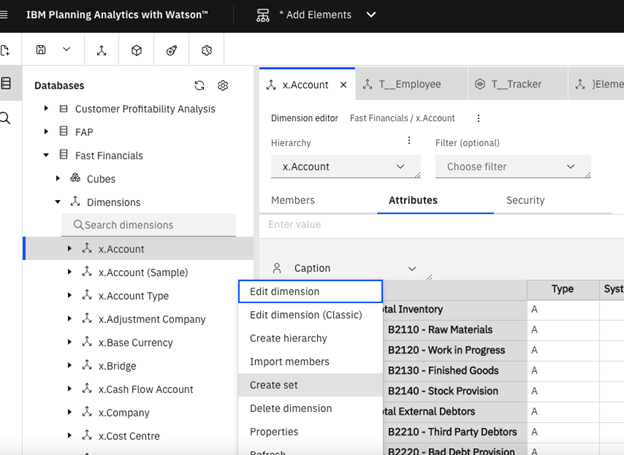
As shown in the example above, you can:
-
Double-click the dimension
-
Or right-click the dimension name and select Create set
This opens the set editor.
The set editor is split into two panels:
-
Available Members (left)
All elements in the dimension -
Current Set (right)
The elements that will make up your subset
You can select elements from the left and move them into your current set on the right.
Filtering your selection #
You can manually select elements, but filters make this much quicker.
We want a set of the posting level intercompany accounts, which we can achieve by using the filter on the ‘Available Members’ panel. Using filters like this is especially useful when working with large or complex dimensions.
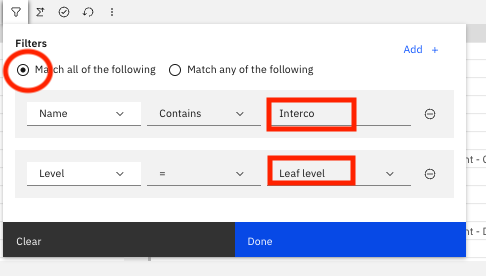
Once filtered, move the selected elements into the Current Set.
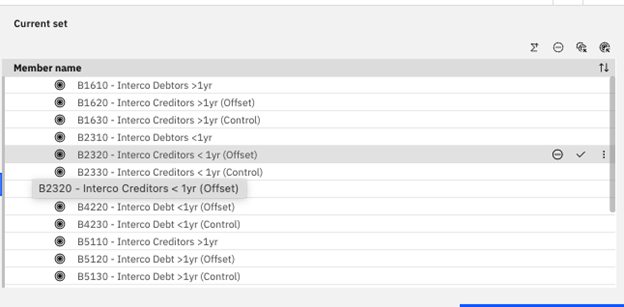
In this set you can move elements around, delete them or add from the ‘Available Members’ pane.
In this example, we remove intercompany creditors and debtors that are less than one year old to refine the analysis.
This only affects the subset, not the underlying data in the cube.
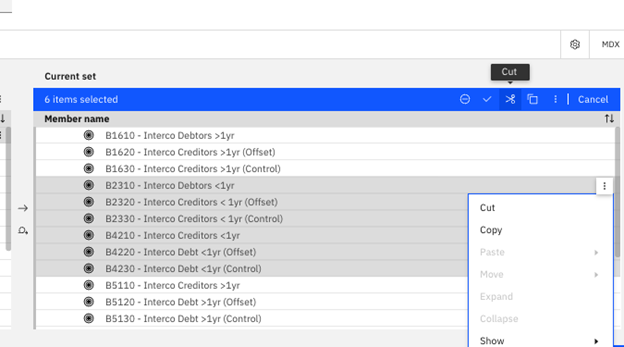
When you are happy with your selection you can click Save.
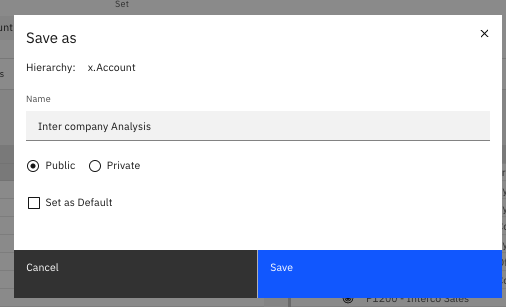
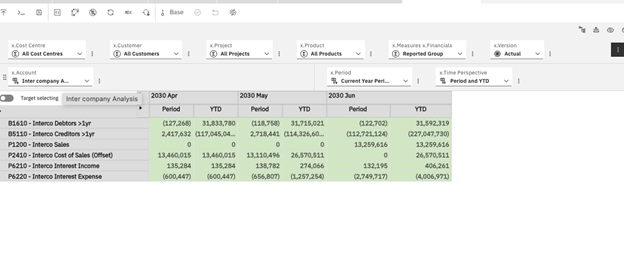
Once saved, your subset can be selected when building or updating a view.
This allows you to quickly switch between different perspectives without rebuilding your selections each time.
Why use subsets? #
Subsets are one of the simplest ways to make Planning Analytics easier to work with:
-
Reduce manual selection and repetitive work
-
Keep reporting consistent across users
-
Focus analysis on the data that matters
-
Make complex dimensions easier to navigate
If you are relying on manual selections or rebuilding views each month, subsets are a simple way to save time and improve consistency.
If you’d like help reviewing your Planning Analytics setup, contact us, we’re always happy to help.


