Search site:

Aramar
  • About Us
  • Our Team
  • Join the Team
  • Insights & Updates
  • Talk to Us
  • Financial Reporting
    • Financial Reporting.

      • IBM Planning Analytics
      • IBM Controller
      • IBM Cognos Analytics
      • IBM Planning Analytics.

        IBM Planning Analytics is business performance management software that combines budgeting and AI-enhanced forecasting with intuitive analysis, reporting and workflows.

      • IBM Controller

        IBM Controller delivers accurate, fully auditable financial results, a guided period close user experience, and automatic consolidation and reporting.

      • IBM Cognos Analytics

        IBM Cognos Analytics is infused with AI and offers an intuitive and user-friendly experience.

    • IBM Planning Analytics
    • IBM Controller
    • IBM Cognos Analytics
  • ITFM
    • IBM Apptio.

      • IBM Apptio
      • IBM Apptio

        Take control of your IT spending and plan with confidence

    • ESG Reporting
      • IBM Envizi.

        • IBM Envizi
        • IBM Envizi

          Turn ESG data into clear, auditable insights and compliant reports.

      • IBM Envizi
    • Customer Success
      • Customer Success.

        • Customer Success Programme
        • Customer Stories
        • Customer Success Programme

          All our customers join our success program.

        • Customer Stories

          Don’t just take our word for it…

      • Customer Success Programme
      • Customer Success
    • Support
      • Support & Delivery.

        • Implementation and Development
        • Cloud Migration
        • Support
        • IBM Licensing
        • Implementation and Development

          From practical, hands-on development through to strategic guidance, our team of specialists is here to help.

        • Cloud Migration

          We have unrivalled experience in helping customers migrate their Business Analytics installations to the Cloud and helping them to take advantage of all IBM SaaS has to offer.

        • Support

          We are proud of our dedicated, friendly support desk, providing IBM Certified support and application support.

        • IBM Licensing

          As an Gold IBM partner, Aramar are able to negotiate the best terms with IBM on software licences and can provide wrap-around support to help you get the best from the products you have purchased.

      • Implementation and Development
      • IBM Cloud Migrations
      • Support
      • IBM Licensing
    • Knowledge Centre
      • Aramar Knowledge.

        • Aramar Specialist Knowledge
        • Expert insight for IBM users

          Explore upgrade guidance, how-to guides and technical best practice across the IBM suite. Practical, real-world insight to help you solve problems faster and get more from your IBM investment.

      • Fast Financials
      • Financial Planning and Analysis 
      • Lease Accounting
    • About Us
    • Our Team
    • Join the Team
    • Insights & Updates
    • Talk to Us

    IBM Planning Analytics

    36
    • How to: Check whether a Dimension exists in IBM Planning Analytics
    • How to: Control Who Has Access to the Planning Analytics Assistant
    • 5 Top Tips for Working with Planning Analytics for Excel (PAfE)
    • How to: Add Spacer Rows and Columns to Universal Reports in Planning Analytics for Excel (PAfE)
    • How To: Subscribe to IBM Security Bulletins for Planning Analytics, Cognos Analytics and Controller
    • How to: Load a file via process in Planning Analytics Workspace (PAW)
    • How To: Find out your Planning Analytics Version using Workbench (Planning Analytics on Cloud)
    • How To: Create a simple hierarchy in Planning Analytics
    • How to: Change maximum login attempts to Planning Analytics on Cloud
    • How to: Using the While statement Turbo Integrator Process in IBM Planning Analytics
    • How to: Change a Dimension Element Weight in Planning Analytics via TI process
    • Aramar Tips: Moving Databases in Planning Analytics
    • How to: Mapping a CSV data source directory in IBM Planning Analytics on Cloud
    • How to: Mapping a Network Drive between Live and Development Environments in Planning Analytics on Cloud
    • How To: Resolve ODBC error ‘unable to open connection to database’ in IBM Planning Analytics 
    • How To: Investigating issues using the TM1 Server Log
    • How To: Check the version of IBM Planning Analytics for Excel
    • How to: Check and manage your IBM Planning Analytics licence usage vs. your licence entitlement
    • How to: Change the display row limit in Planning Analytics for Excel
    • How To: Set up Inactivity Timeout Sessions in IBM Planning Analytics
    • How To: Install Planning Analytics for Excel (PAfE)
    • How to: Check the Security of a Dimension in IBM Planning Analytics
    • Aramar Tips: Using PowerShell in Planning Analytics
    • Fundamentals: Feeders in IBM Planning Analytics
    • Fundamentals: Cube Viewer in Planning Analytics for Excel
    • Fundamentals: DBRW in Planning Analytics
    • How to: Create a Dimension in IBM Planning Analytics
    • Fundamentals: What are Dimensions in IBM Planning Analytics?
    • How to: Edit Dimensions in IBM Planning Analytics
    • How to: Create a Cube in IBM Planning Analytics
    • How to: Create Subsets driven by another Dimension in Planning Analytics
    • Aramar Tips: Creating documentation IBM Planning Analytics
    • Aramar Tips: Checking your parameters with a Planning Analytics TI Process
    • Aramar Tips: Analysing Data in IBM Planning Analytics for Excel
    • How to: Add a new Element to an existing Dimension in IBM Planning Analytics
    • Aramar Tips: Working with Subsets in IBM Planning Analytics

    IBM Cognos Analytics

    1
    • How To: Subscribe to IBM Security Bulletins for Planning Analytics, Cognos Analytics and Controller

    IBM Controller

    29
    • Weekly reporting vs period close in IBM Controller: what to consider
    • How to: Audit the Licenced Number of Controller Users
    • How to: Reconcile Data by Company in IBM Controller Web
    • Aramar Tips: The Benefits of Using IBM Controller Web for Data Import via Import Specifications
    • How to: Improve your Controller Excel Report Performance
    • Fundamentals: What’s the difference between IBM Controller Web and IBM Controller Classic?
    • How to: Create Multi Period Import Specs in IBM Controller Web
    • How to: Change the reporting currency belonging to a local subsidiary (or reporting entity) in IBM Controller
    • How to: Effectively structure user security in IBM Controller
    • How to: Run an internal database optimise in IBM Controller
    • How to: Schedule an internal optimise in IBM Controller
    • How to: Check currency translation using a standard report in IBM Controller
    • How to: Drill Data within IBM Controller
    • How to: Change the reporting currency belonging to the group consolidation in IBM Controller
    • How To: Change the method of translation applied to the P&L statement, or create different P&L translation views from the same source data in IBM Controller
    • How to: Check when a Company was last updated (and by who) from within IBM Controller Web
    • How to: Consolidate a Submission in IBM Controller Web
    • How To: Log into Citrix for the first time using IBM Controller on Cloud
    • How To: Interrogate the backend SQL table using IBM Controller
    • How To: Fix the Intercompany button not appearing in IBM Controller
    • How to: Check the size of your IBM Controller database
    • How to: Clear the local cache within Controller
    • How to: Condense XACCLOCK Table
    • How To: Subscribe to IBM Security Bulletins for Planning Analytics, Cognos Analytics and Controller
    • How to: Save Time Posting Journals on Accounts That Reconcile to Each Other
    • How to: Add Companies to Linked Structures Directly from the Company Structure Menu
    • How to: Back Up an IBM Controller Database
    • How to: Navigate the Backend SQL tables within IBM Controller
    • How to: When Does the FAP Publish Client from Controller Need Updating?

    Extra Insights

    3
    • How To: Subscribe to IBM Security Bulletins for Planning Analytics, Cognos Analytics and Controller
    • How to: Manage Users in IBM MySupport
    • Aramar Tips: 5 Easy tips to consider when adding commentary to your financial reports 
    View Categories
    • Home
    • knowledge-share
    • IBM Planning Analytics
    • 5 Top Tips for Working with Planning Analytics for Excel (PAfE)

    5 Top Tips for Working with Planning Analytics for Excel (PAfE)

    5 Top Tips for Working with Planning Analytics for Excel (PAfE) #

    By Adam Bakhtiar

    If you use IBM Planning Analytics for Excel (PAfE) regularly, you’ll know just how powerful it is, and how many handy tricks there are to make life easier.

    The Excel add-in is packed with functionality for data exploration and reporting. In this short guide, I’ll share five of our favourite tips to help you get more out of the Cube Viewer in Planning Analytics for Excel.

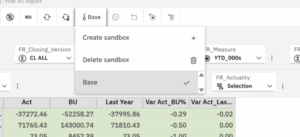
    1. How to create Sandbox: #

    A sandbox is a personal copy of your database where you can test changes without affecting the main (base) data. It’s ideal for trying out “what-if” scenarios safely.

    How to create a sandbox:

    1. Click the ‘Base’ then create sandbox

    2. Give your sandbox a name.

    3. Choose whether to start from the base data or copy an existing sandbox.

    4. Click OK.

    You can switch between sandboxes using the drop-down list at the top. When you’re happy with your changes, click Commit data to make them live.

    To delete a sandbox, go to Sandbox → Delete Sandbox, select the one you want to remove, and click Delete.

    💡 Tip: Sandboxes are visible only to you until you commit them, which makes them a safe space to experiment!


    2. Show Values as Percentages #

    Need a quick way to see proportions or compare performance? The Show cell value as… option helps you view data as percentages of rows, columns, or totals.

    How to use it:

    1. Right-click a cell and select Show cell value as…
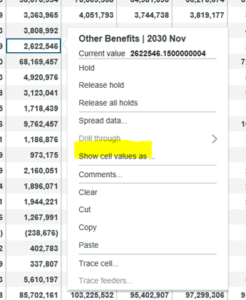
    2. Choose from:

      • % Row Total – values as a percentage of each row total

      • % Column Total – values as a percentage of each column total

      • % Grand Total – values as a percentage of all data points

    To go back to normal values, simply choose As-is.

    3. Hide Columns and Rows #

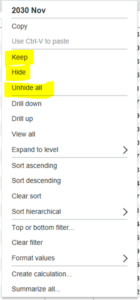
    Sometimes less is more. If you want a cleaner view or are building an asymmetric report, you can quickly hide or keep only certain rows or columns.

    To hide or keep rows/columns:

    1. Select one or more rows or columns.

    2. Right-click and choose either:

      • Hide – hides the selected items.

      • Keep – hides everything except the selected items.

    To restore all, right-click and select Unhide all.
    4. Do the Maths (Member and Summary) #

    Need a quick calculation? In Cube Viewer, you can now create member or summary calculations.

    Member calculations

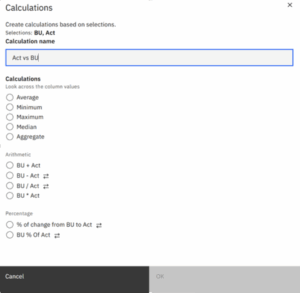
    Member calculation will create results of calculation between two members selected.

    Below you can select Act and BU, column, right click then select ‘Calculation’ then ‘Member Calculation’
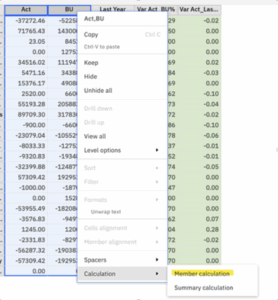
    Name the calculation then select type of calculation
     

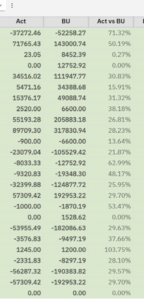
    Calculation will be displayed as a new column
     

    Summary calculation

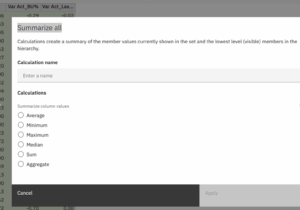
    Similar to member calculation, when you select two members, you can also create a new column containing ‘summary’ .

    To create summary calculations, select two members then select ‘summary calculations’. Give the new column a name and select the calculation options:
     

    5. Summarise It for Me #

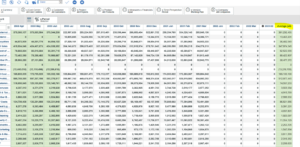
    When you’re working with lots of data, summaries are your friend. PAfE can instantly generate summary rows or columns for visible data.

    How to summarise:

    1. Select the rows or columns you want to summarise.

    2. Right-click and choose Summarize all.

    3. Pick your preferred summary type (e.g. sum, average, max, min).

    PAfE will insert a new row or column showing the result.
     

    Final Thought #

    There are plenty more features worth exploring in Planning Analytics for Excel.

    Try these five out next time you’re in the Cube Viewer and see how much faster your analysis becomes.
    And if you’ve got a favourite PAfE trick of your own, we’d love to hear it!

    💬 Got a question or want to see how we can help your business get more from IBM Planning Analytics?
    Contact us today for expert advice.

    Updated on December 3, 2025

    Was this helpful?

    • Happy
    • Normal
    • Sad

    Share This Article :

    • Facebook
    • X
    • LinkedIn
    How to: Control Who Has Access to the Planning Analytics AssistantHow to: Add Spacer Rows and Columns to Universal Reports in Planning Analytics for Excel (PAfE)
    Sections
    • 5 Top Tips for Working with Planning Analytics for Excel (PAfE)
      • 1. How to create Sandbox:
      • 2. Show Values as Percentages
      • 3. Hide Columns and Rows
      • 4. Do the Maths (Member and Summary)
      • 5. Summarise It for Me
      • Final Thought

    Our Accreditations and Partners

    Aramar works with customers of all sizes, from a range of industries helping them with Business Analytics, Business Process, Sustainability and AI solutions using IBMs leading software solutions.

    email contactus@aramar.co.uk

    • LinkedIn
    • YouTube

    Registered Address:
    124 City Road,
    London,
    EC1V 2NX

    © Aramar 2026. All Rights Reserved.

    Terms of use Privacy Policy

    Website and Marketing by Unity Online