One of the key features of Turbo Integrator in IBM Planning Analytics is the ability to check whether a dimension exists before importing data. #
Turbo Integrator remains a core component of IBM Planning Analytics, powering automated data loads, model maintenance, and administrative logic behind the scenes.
One common best practice when building robust, repeatable processes is to check whether required dimensions exist before importing or manipulating data. This avoids process failures and supports safer automation across environments.
Step 1: Open Turbo Integrator Process editor #
From Planning Analytics Workspace, navigate to Data and Models. This is typically added in theProlog tab of the process.
Step 2: Create a new process #
To do this, click on the Create Process option in the Processes section of the database.
Step 3: Add a dimension check #
Next, you will need to add a dimension check to your process. To do this, click on the Add button in the toolbar and select DimensionExists from the dropdown menu.
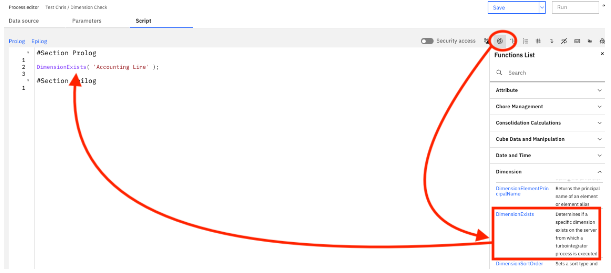
Step 4: Configure the dimension check #
In the Process editor, you will need to specify the name of the dimension that you want to check. You can also specify whether you want to create the dimension if it does not exist, i.e., the return value from DimensionExists is equal to 0.
If ( DimensionExists( ‘Accounting Line’ ) = 0 );
DimensionCreate( ‘Accounting Line’ );
EndIf;
This ensures the process can run safely even if the dimension has not yet been created, reducing manual dependencies and deployment errors.
Step 5: Save and run the process #
Once you have configured the dimension check, you can save your process and run it. If the dimension exists, the process will continue to run as normal. If the dimension does not exist, the process will either create the dimension (if you have specified this option) or stop running.


